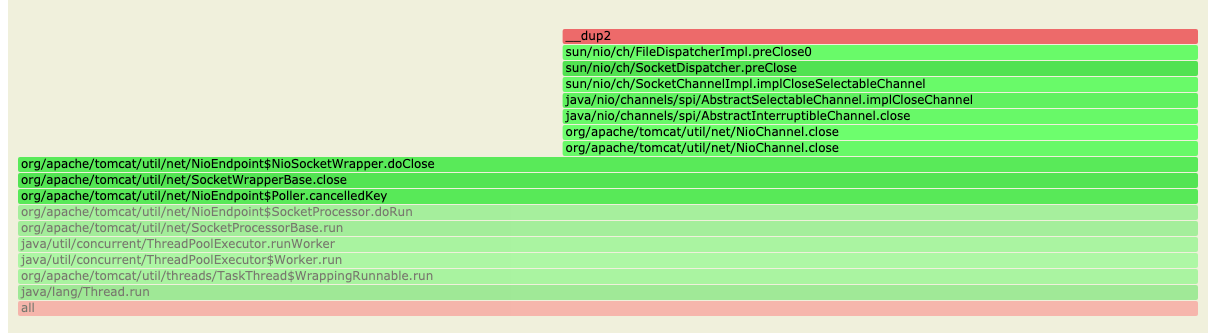
使用 asyncProfiler 能捕获 Java 的栈, 使用 perf 能捕获操作系统栈, 由于 JVM 使用自己单独的虚拟机, 所以不能同时访问 2 部分栈. Netflix 的教程(https://netflixtechblog.com/java-in-flames-e763b3d32166), 能捕获 2 个在一起的栈. 需要做 2 件事情:
- 对 Java 进程添加
-XX:+PreserveFramePointer flag - 生成当前正在运行的 Java 进程的 符号表文件. asyncProfiler 和 bpftrace 都需要这个文件在
/tmp/ 目录下, 并且以 perf-<pid>.map 的形式存在.
如 ls -lah /tmp/perf-2868448.map
假如不使用 Java 运行时符号表
你将看到如下的栈信息, 毫无用处:
  0x7f72beee3337
  0x7f72be72e399
  0x7f72be72ed3e
  0x7f72be1a7d98
  0x7f72be1aacb1
下面就是关于如何产生符号表文件的教程.
clone 或者下载最新版本 https://github.com/jvm-profiling-tools/perf-map-agent
curl -vvv 'https://github.com/jvm-profiling-tools/perf-map-agent/archive/refs/heads/master.zip' --output perf-map-agent.zip

# or
git clone https://github.com/jvm-profiling-tools/perf-map-agent.git
设置 JAVA_HOME 环境变量
export JAVA_HOME=/home/supra/work/tools/myjdk/jdk11/jdk
编译
# 解压并进入该文件夹
unzip perf-map-agent.git && cd perf-map-agent
cmake .
make
产生 perf-.map
./bin/create-java-perf-map.sh $(pgrep java)
# 到 /tmp 目录查看对应的 perf-<pid>.map 是不是存在了
ls /tmp/ | grep .map
-rw-rw-r--  1 root  root   29K Nov 13 06:29 perf-2868448.map
使用 bpftrace 的例子
sudo bpftrace -e 'tracepoint:syscalls:sys_enter_pread /comm=="java"/{ @[ustack(20)] = count(); }'

# or
sudo bpftrace -e 'tracepoint:syscalls:sys_enter_pread /pid==2868448/{ @[ustack(20)] = count(); }'
可能遇到问题:
如果遇到下面:
-- The C compiler identification is GNU 7.5.0
-- The CXX compiler identification is unknown
-- Check for working C compiler: /usr/bin/cc
-- Check for working C compiler: /usr/bin/cc -- broken
CMake Error at /usr/share/cmake-3.10/Modules/CMakeTestCCompiler.cmake:52 (message):
 The C compiler

 "/usr/bin/cc"

 is not able to compile a simple test program.

 It fails with the following output:
则安装编译工具
sudo apt-get cmake
sudo apt-get install build-essential
如果遇到下面:
Sorry, user xxx is not allowed to execute '/yyyy/bin/java -cp /home/xxx/perf-map-agent-master/bin/../out/attach-main.jar:/yyyy/lib/tools.jar net.virtualvoid.perf.AttachOnce 23545 ' as xxx on hostzzzz.txh.com.
那么我们可以到 perf-map-agent-master/out/ 目录下去执行这个命令就好了, 不是执行 create-java-perf-map.sh.
- 关于要如何使用 root 的, 查看 Netflix 的那个文档
- 创建 perf-.map 要使用 java 应用启动相同的用户名, 因为 java 应用的 agent 要使用同样的用户才能访问对应的 java 程序.
如果你发现即便使用了运行时 Java 进程的符号表, 可是还是很多翻译的栈, 如下:
__GI___recv+110
 Java_java_net_SocketInputStream_socketRead0+434
 Interpreter+28336
 Interpreter+4352
 Interpreter+4352
 Interpreter+4352
 Interpreter+4352
 Interpreter+5875
 Interpreter+4352
 Interpreter+4352
 Interpreter+3728
 Interpreter+3728
 Interpreter+5184
 Interpreter+5184
 Interpreter+4352
 call_stub+138
 JavaCalls::call_helper(JavaValue*, methodHandle const&, JavaCallArguments*, Thread*)+883
因为只有编译的代码才有符号表, 翻译的是没有的, 所以要让它尽快尽早JIT编译, 因此, 要通过下面2个参数:
-XX:-TieredCompilation -XX:CompileThreshold=1
2个参数分别是: 禁止分层编译, 然后只要运行1次就JIT编译. 所以完整的命令是:
java -XX:+PreserveFramePointer -XX:-TieredCompilation -XX:CompileThreshold=1 myJavaApp.
同时要确保你的编译cache 足够大.
这样, 你就得到了如下的代码栈:
 __GI___recv+110
 Java_java_net_SocketInputStream_socketRead0+434
 Ljava/net/SocketInputStream;::socketRead0+244
 Ljava/net/SocketInputStream;::read+224
 Ljava/io/BufferedInputStream;::fill+784
 Ljava/io/BufferedInputStream;::read1+176
 Ljava/io/BufferedInputStream;::read+252
 Lsun/net/www/http/HttpClient;::parseHTTPHeader+444
 Lsun/net/www/http/HttpClient;::parseHTTP+1004
 Lsun/net/www/protocol/http/HttpURLConnection;::getInputStream0+1420
 Lsun/net/www/protocol/http/HttpURLConnection;::getInputStream+196
 Ljava/net/HttpURLConnection;::getResponseCode+96